February 22, 2021
Designing a Score Tracking App with Shiny
Creating a scoreboard for my friends' favourite game
Over the past 5 years, my friends and I developed our own variation of the relatively popular drinking game beer die (or snappa).
Naturally we think we made it a much better game, with the rules designed to encourage more athleticism, finesse, and generally more impressive plays.
Due to our overwhelming love of the game, I have always been curious about tracking and analyzing the outcomes of each game.
We needed wanted something that could do basic things like track the score and report our performance, but also more complex tasks like validating the data entry process to minimize human error.
What this amounted to was a scoreboard app made with RShiny, using a PostgreSQL database to house the data.
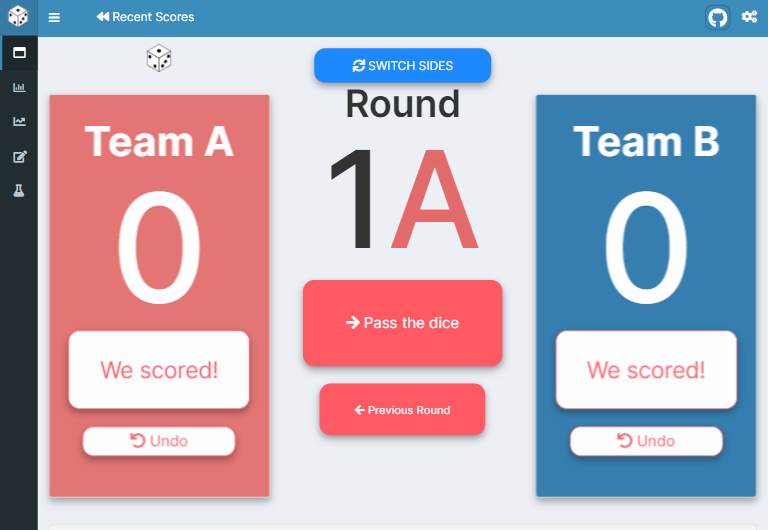
Figure 1: The scoreboard screen is where we keep track of the round and enter (or remove) points. It also has a button which switches the sides and a die icon to indicate the active team.
What is Snappa?
A very fair question! You would be wholeheartedly forgiven for being completely ignorant of this game’s existence. We were introduced Snappa over the Summer of 2015 by a good friend, and we immediately saw the potential for endless hours of enjoyment.
At its core, Snappa is a team game (read: sport) played with dice and pint glasses at a relatively large table. 1 × Technically I am talking about Beer die which is played standing up, while Snappa is played sitting down. Why do we still call it Snappa then? Well it’s just got a nicer ring to it, that’s all. Each team scores points by throwing their die high in the sky, landing it on the opponents’ side of the table and ideally landing in one of the opponents’ glasses. There is a lot more to it than that, but that is the basic idea.

Figure 2: Note that these players do not exactly resemble the authors of Snappa Scoreboard, perhaps with the exception of the fellow in the blue…
Data
Our data collection and score tracking efforts had been pretty minimal before developing the scoreboard. Score tracking was done either by memory, or using a plastic flip-over scoreboard (truly a fantastic impulse purchase). So the first step in the development process was deciding what information we wanted to collect, and which information was feasible to do so. We ended up with this data model:
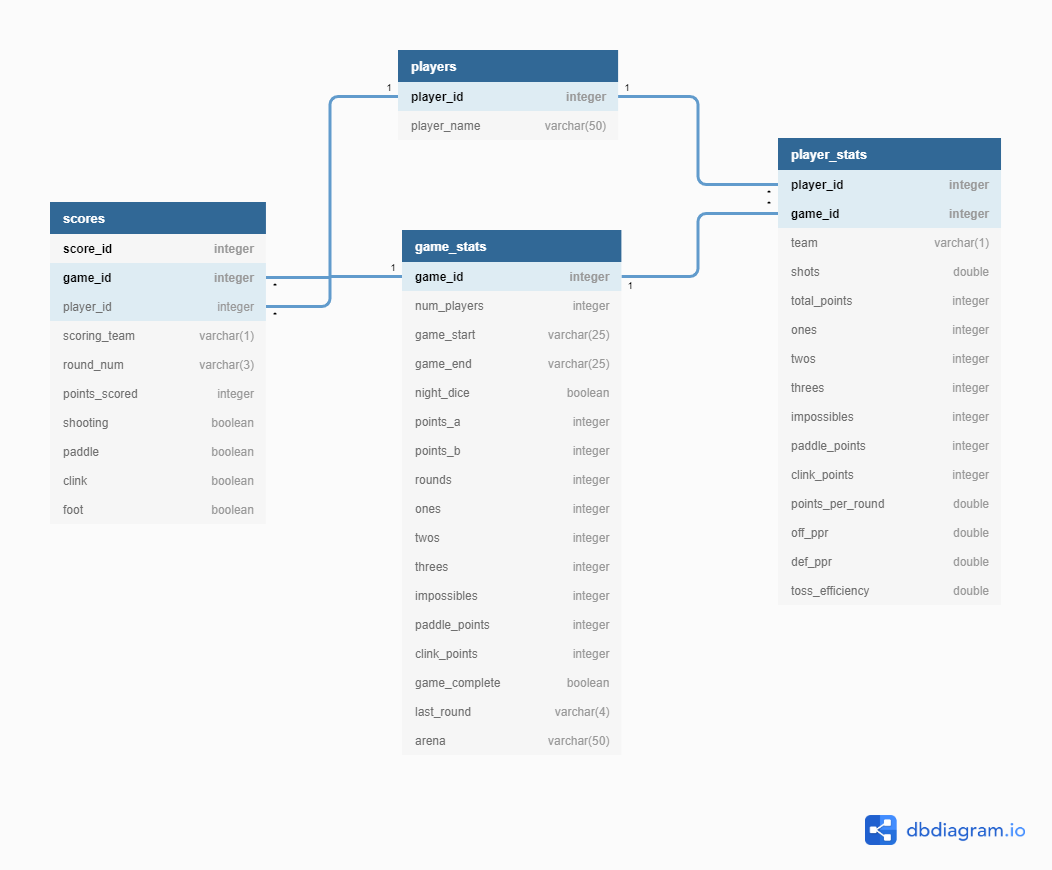
Figure 3: Our database design reflects the planned levels of analysis.
playersstores our players’ names and IDs.scoresstores score-level information like the number of points scored, the scorer, and how the point was scored.game_statsstores game-level information like the date/time, the number of players, and whether the game had been completed (this turned out to be crucial).player_statsstores game-level information for each player like which team they were on, how many points they scored, and a number of simple metrics we developed.
This was really our first time building a database.
In hindsight, I think both game_stats and player_stats could have existed as views, with a games table containing unique game-level information.
Perhaps in the future we will re-arrange our database to eliminate redundancy.
Interface
Once we had our intended data structures in place, we needed to design the UI and UX to enable scorekeeping. We needed a round counter to increment and display the round number, a score input to enter score-related information such as who scored, when they scored, and how they scored, and score counters to display the score for either team.
Round counter
Our teams are creatively labelled Team A and Team B. A round is akin to an inning in baseball—it consists of Team A shooting while Team B defends, and after each player on Team A has thrown their die, Team B shoots while Team A defends. As such we defined each round as having an A part and B part, shown in the vector below.
rounds = str_c(rep(1:100, each = 2), rep(c("A", "B"), 100))

rounds[1:10]
## [1] "1A" "1B" "2A" "2B" "3A" "3B" "4A" "4B" "5A" "5B"But as we needed to increment (and decrement) the round number, we needed a few different elements in our server function.
- an equivalent numeric counter which we called
shot_numis stored in areactiveValuesobject.
vals <- reactiveValues(

  shot_num = as.integer(1)

)- A reactive element which uses
shot_numto alias our round labels in areactiveexpression
  round_num = reactive({
    rounds[vals$shot_num]
})- The button input used to increment the round. It is a reactive output generated by
renderUIbecause we wanted to change the colours of the buttons depending on the round.
  output$round_control_buttons = renderUI({
      # these colours represent the status options in actionBttn()
      team_colours = list("A" = "danger", "B" = "primary")

      column(width=12, align = "center",
             # Next round button
             actionBttn("next_round",
                        size = "lg",
                        label = "Pass the dice",
                        style = "jelly", icon = icon("arrow-right"),
                        color = team_colours[[str_extract(round_num(), "[AB]+")]]),
    )
})- An observer to receive the input from the
next_roundbutton usingobserveEvent
  observeEvent(input$next_round, {

    vals$shot_num = vals$shot_num+1

  }
Each of these code snippets reside within our server function which is laid out below.
Code
# Server ------------------------------------------------------------------
server <- function(input, output, session) {

  ##################################
  ##    Shot counter              ##
  ##    - Reactive Values object  ##
  ##                              ##
  ##################################
  vals <- reactiveValues(

    ...,

    shot_num = as.integer(1),

    ...,

  )


  ##################################
  ##    Round number              ##
  ##    - Reactive expression     ##
  ##                              ##
  ##################################
  round_num = reactive({
    rounds[vals$shot_num]
  })

  output$round_num = renderUI({
    team_colours = list("A" = "#e26a6a", "B" = "#2574a9")

    round_number = str_extract(round_num, "[0-9]+")
    round_letter = str_extract(round_num, "[AB]+")
    round_colour = team_colours[[str_extract(round_num, "[AB]+")]]

    HTML(str_c('<h3 class="round_num">',round_number,
               '<span style="color:',round_colour, ';">', round_letter, "</span>",
               "</h3>"))

  })

  ##################################
  ##    Round control buttons     ##
  ##    - Reactive UI output      ##
  ##                              ##
  ##################################
  output$round_control_buttons = renderUI({
      # these colours represent the status options in actionBttn()
      team_colours = list("A" = "danger", "B" = "primary")

      column(width=12, align = "center",
             # Next round button
             actionBttn("next_round",
                        size = "lg",
                        label = "Pass the dice",
                        style = "jelly", icon = icon("arrow-right"),
                        color = team_colours[[str_extract(round_num(), "[AB]+")]]),
    )
  })

  ##################################
  ##    Round incrementer         ##
  ##    - Reactive observer       ##
  ##                              ##
  ##################################
  observeEvent(input$next_round, {

    ...

    vals$shot_num = vals$shot_num+1

    ...

  }

  ...

}
I’m introducing a lot in the code above - the reactiveValues() object is where we store most of the data which is subject to change in the app,
2
×
While it isn’t entirely clear to me whether this is better/worse than having separate reactive() objects, it hasn’t caused us major issues yet. the reactive expression round_num() is our labelled version of the shot number, the outputs are reactive UI elements which change colour to match the shooting team, and the observer increments the shot number when the next round button is pressed
To be clear, the above is only snippets of code to highlight the elements related to the round counter, hence the ellipses. Later we discovered that users (even those of us who designed the app) make mistakes, and having a Previous Round button became essential.
Score input
The round counter tracks when points are scored.
Now we need to know what points are scored, by whom, and how.
Initial drafts of the score counter were numeric inputs that the user could increase to input the number of points but this proved cumbersome and prone to mistakes based on how the numericInput() function works in Shiny.
So frequent were the complaints that we had to sit down and figure something out.
We settled on a modal dialog box using a combination of radio buttons and checkboxes
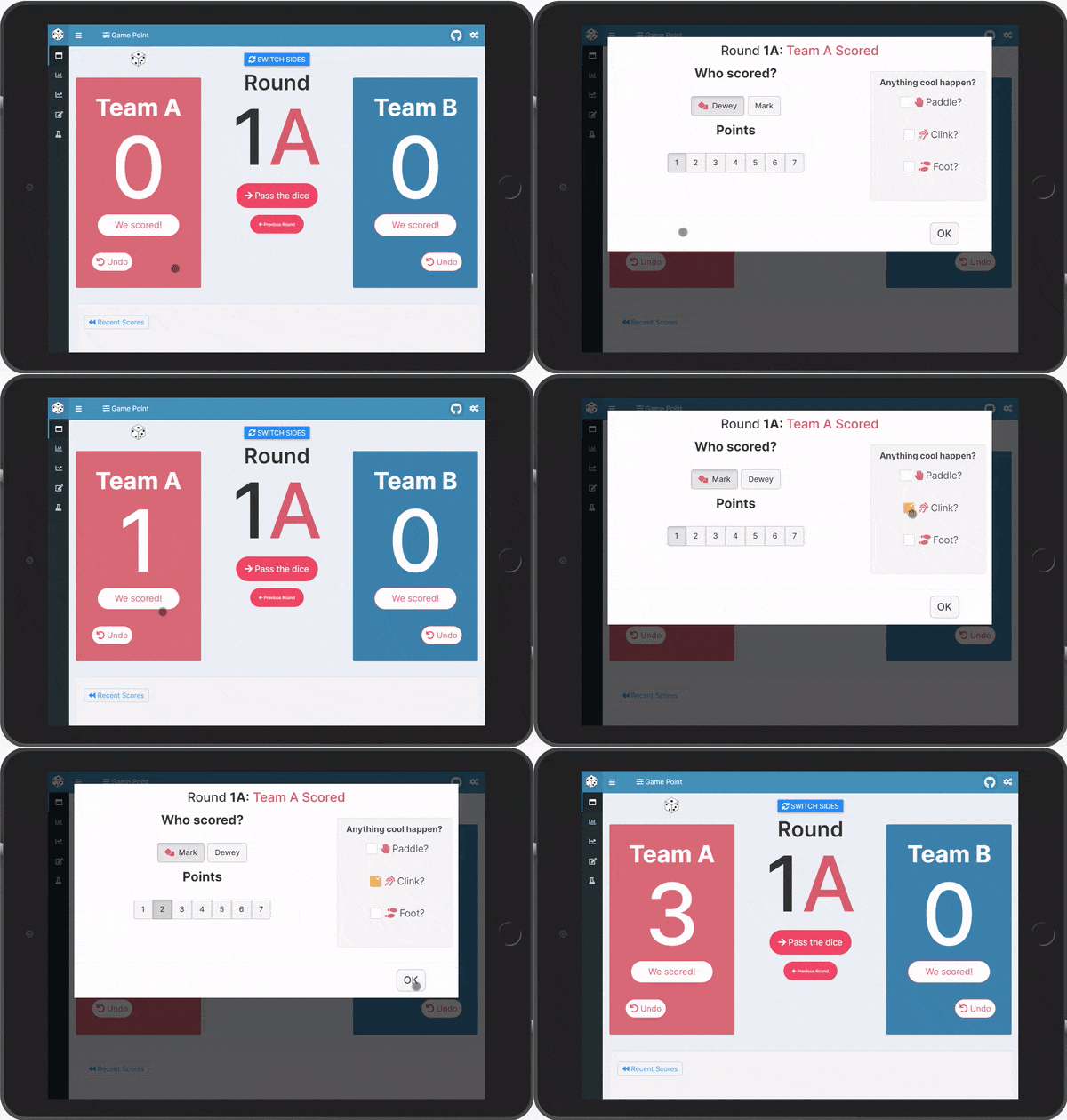
Figure 4: The dialog box used to input score information
Basic Measures
The Snappa Scoreboard is at its core a score-tracking application.
We are hoping in future iterations to track defensive performance, but for now we are confined to point-scoring events.
These events are tracked in the scores table of our database.
Point-scoring events come in two varieties in our dialect of Snappa:
- Throws
- Paddles
Throws
Players throw their die each round and, provided their throw was high enough and lands on the opponents’ side of the table, they score in a number of scenarios:
- The die bounces off the table and is not caught by an opponent.
- The die clinks off an opponent’s glass.
- The die sinks an opponent’s glass.
Given these possible outcomes, we have a number of measures of player performance in a game:
Total Points: Total points scoredPoints per Round: Points scored divided by the number of rounds playedToss Efficiency: How many successful (i.e. scoring) throws a player had
Paddles
Paddles, put simply, are a joke which we took too far because it produced some of the most exciting moments of the game. A paddle occurs when the defending team returns a successful throw by “paddling” the die with their hand. In order to be a successful paddle, the die must land on their opponents’ side. Of course, a successful paddle could also be paddled back by the Offensive team. Here you can see the recursive possibilities.
“You miss 100% of the shots you don’t paddle.” — Peter the Paddler
If I’ve lost you at this point, that’s totally fine. The main thing to know is that paddles score points in much the same way as throws do, they just look cooler. As a result, we have a few more fields in order to differentiate the scoring method.
Paddle Points: Total paddle points scoredOffensive Points per Round: Number of points scored with successful throws, divided by the total number of throwing roundsDefensive Points per Round: Number of points scored with successful paddles, divided by the total number of rounds